Indicators are dials that visualize the structure Layers 1–3 already taught you to see. None of them generate the thesis — they delete the work of finding what your eye would eventually find anyway, but slower and less precisely. If your stops are wrong, no scanner will save you. Read this layer as a tooling supplement, not as the engine.
The actual tools: Hold Levels, Break/Origin Detector, Native Candles & HTF Closes, the Bias Scanner, Origin Bot in Discord, and the Fib-Lab Dashboard. Settings explained, with the trade-offs that aren't in the docs.
The full indicator stack on one chart — what each line means is in the chapters below.
ATR too tight = no alerts; too wide = constant noise
Bias Scanner
Native Candles + HTF Closes
Paints pending HTF close on your TF
Predict where the close lands
TF mapping, custom periods
Custom-period TF mismatch silently breaks reads
Time & Levels rule
Bias Scanner
One number per TF bracket across the market
Tell you which token to trade
Token universe, TF brackets
Reading the number as a signal, not as bias
Origin Bot for entries
Origin Bot / OTA Scanner
Discord pings when an origin prints; OTA Scanner watchdogs all 540+ tokens by TF
Confirm the trade is takeable
/origin command flags; TF filter in OTA Scanner
Acting on the alert without your own thesis
Detector for confirmation
Fib-Lab Dashboard
Multi-token table + heatmap + chart viewer
Replace the chart in TradingView
Filter cohort, refresh cadence
Treating the dashboard as the chart
Everything above
Chapter 4.1
What does the Hold Levels indicator do and when does it fire?
▶
Eye-balling every body engulfment across six timeframes is the single slowest part of FibLab. Hold Levels does the scan; you spend the saved time deciding which level to trade.
What it does
Highlights all hold levels (body engulfments) and optionally wick engulfments on every relevant TF near price. Source of truth for the ladder rungs.
What are the key settings?
The ones you actually tune
Minimum move: default 0.4%. Skips holds too small to overcome fees. Anything under ~0.4% is noise for most traders.
Refinement search:Nearest pending below / Nearest pending above. Returns sub-TF levels inside a parent hold for greedy entries.
Engulfment type: body-only, wick-only, or both. Default body. Use wick-only for pure range trading with the range fibs.
Status filters: pending / active / completed / revisited / hard-closed-and-polarized. Toggle by what you're hunting.
Range filter (proximity): default 2. Increase to see more levels farther from price; decrease for cleaner view.
Cosmetics: label size, padding, line color, position.
The alerting rule that matters
Refinements ON for trade planning, OFF for alerts
Keep refinement search OFF when setting alerts. Every level on every sub-TF triggers separately — your phone will buzz constantly. Turn refinements ON only when you're actively planning the entry on a specific level.
The TradingView reality check
"TradingView just can't keep up. On lower TFs the indicator can crash. Just toggle it off and on."
— Syndotc · Video 01
Indicator stays data-rich, not dumbed-down. Accept occasional crashes — refresh and continue.
Hold Levels is the eye-replacement layer — what your eye does in 60 minutes, the indicator does in 60 milliseconds.
Chapter 4.2
What does the Break / Origin Detector do?
▶
An origin is the precise pixel where a break reversed — get the candle wrong and your stop is in the wrong place. The detector marks the exact wick, so the highest-confidence trade in FibLab isn't a guess.
What it does
Shows all break levels and origin levels with proximity alerts and ATR-based notifications. Flags pure vs non-pure. Tags BUT levels and range hit origins.
What are the key settings?
The dials
Show pure / non-pure: keep BOTH on. Non-pure gets flagged for higher-TF investigation.
Status filters: touched, untouched, broken-retested. Keep all on.
Range hit origins: toggle on. Useful for catching "very fast pumps" before they happen.
Pick 5-10 tokens. Set proximity alerts on 4H/8H/12H/Daily. Get notified whenever a level is created, broken, touched, or in proximity. Eliminates manual chart scanning.
ATR proximity caveat
Set too low → tight band, you won't get warning before fast moves.
Set too high → noise, alerts fire when nothing actionable is happening.
Test in your timezone with your assets.
The non-pure trap
Single-candle hard close on a non-pure level ≠ break. True level lives on a higher TF — cross-reference with the dashboard's price filter or OTA Scanner.
The detector marks the pixel; you pick the trade. Don't trust the alert without your own thesis behind it.
Chapter 4.3
What are Native Candles and why do HTF closes matter?
▶
Reacting to a 4H close is too late; front-running it is too early. These two indicators paint the higher-TF close on the timeframe you're already watching, so you decide before the candle prints, not after.
Two indicators that pair
HTF Closes: table of upcoming TradingView native and exchange-native time-frame closes. Yesterday/tomorrow, fractal countdowns, market sessions, exchange-native daily anchors.
Native Candles: virtual high-time-frame candle painted on your chart at any custom period (604 days, 7 days, 134 days, etc.).
HTF Closes settings
What to enable
Fractal countdowns — when the next 1m / 3m / 5m / 72m / 134m / etc. close happens.
Market sessions — NY, London, Asia open/close.
Native exchange closes — often differ from TradingView's daily anchor. Critical.
Max rows in the table.
Position (top-right, bottom-left, etc.) and background opacity.
Why fractal countdowns matter for scalping
Trading the 1H, but a 4H candle closes in 22 minutes — that close shifts every level in the 1-4H bracket. Knowing exactly when lets you wait for it. (Fractal mechanic: see Layer 2.3.)
Native Candles settings
The unique controls
Period length: any number. 604 on a daily chart = a virtual 604-day candle. On weekly = 604 weeks. On monthly = 604 months.
Auto trends: built-in auto-trend detection.
Anchor mode: "start of bar" vs "center of bar". Matters for time-arrayed trends — try both, pick what's cleaner on your TF.
Wicks on/off: wicks visible let you snap trend lines exactly to high/low. Turn bodies off if the chart feels too noisy.
The 604-day candle revelation
SOL · Video 03 — long-term structure invisible on TV
Set Period Length: 604 on daily chart Reveals: one giant 604-day candle Top of the 604-day candle: exact rejection point Price tapped it → dumped. Spotted in seconds. Invisible on standard TV daily.
Why you can't trust TradingView's period candles
A TV "50-day" candle can open 17 Dec and close 1 Jan — that's not a true 50-day period. It corrupts BOTH the trends AND the structural levels you read off it (TV was built for fixed stock sessions, not 24/7 crypto).
Use the native-candle indicator for true periods. A weekly ≈ a 7-day native (same TF, different anchor); a monthly isn't fractal — use a 28-day for a "weekly", and note monthly moves often kick off ~2 days early.
TV aggregation is only reliable on factors of 1440 (4h / 8h / daily roll cleanly).
A 1H view that paints the pending 4H close lets you trade before the candle prints, not after.
Chapter 4.4
What is the Bias Scanner and how do you read it?
▶
Reading 60 charts to answer "is the market red or green right now" costs an hour and several wrong calls. The Bias Scanner reduces that question to one number per TF bracket — the macro frame every individual trade lives inside.
The market-wide brain
Real-time scanner across ~540 tokens by TF bracket. Shows where the whole market is positioned before the next major close.
The four metrics
What each tells you
Origin Potential Bias: resistance vs support being created RIGHT NOW. Low number on 1-4H = lots of resistance building → high probability of rejection if price pushes up.
Broken Level Bias: balance of already-broken levels waiting to be retested. >50% downside = more magnets below. Tells you where liquidity sits.
Upside Break Bias: predicted candle-close direction — bias to break support down or break resistance up.
% Bullish Origins: when very low → market is building far more bearish than bullish structure.
The three time-frame buckets
1-4 hour — short-term tactical. Most actionable for day traders.
6-12 hour — bridge between intraday and swing.
1-day plus — strategic / swing.
The most powerful read — bucket disagreement
Lower TFs breaking down while higher TFs build support → short-term breakdown into HTF support, then bounce.
Real prediction example · Video 05
Heading into daily close:
1-4H upside bias: 17% (massive resistance being built)
6-12H: ~50%+ bullish
Daily+: ~50%+ bullish
Read: short-term retrace into support, then bounce, then rejection again "You go down, you go up, you go down, you go up." Played out exactly.
When to check
Before 4H and Daily closes — every level in the bracket flips at close. Clearest signal heading into them.
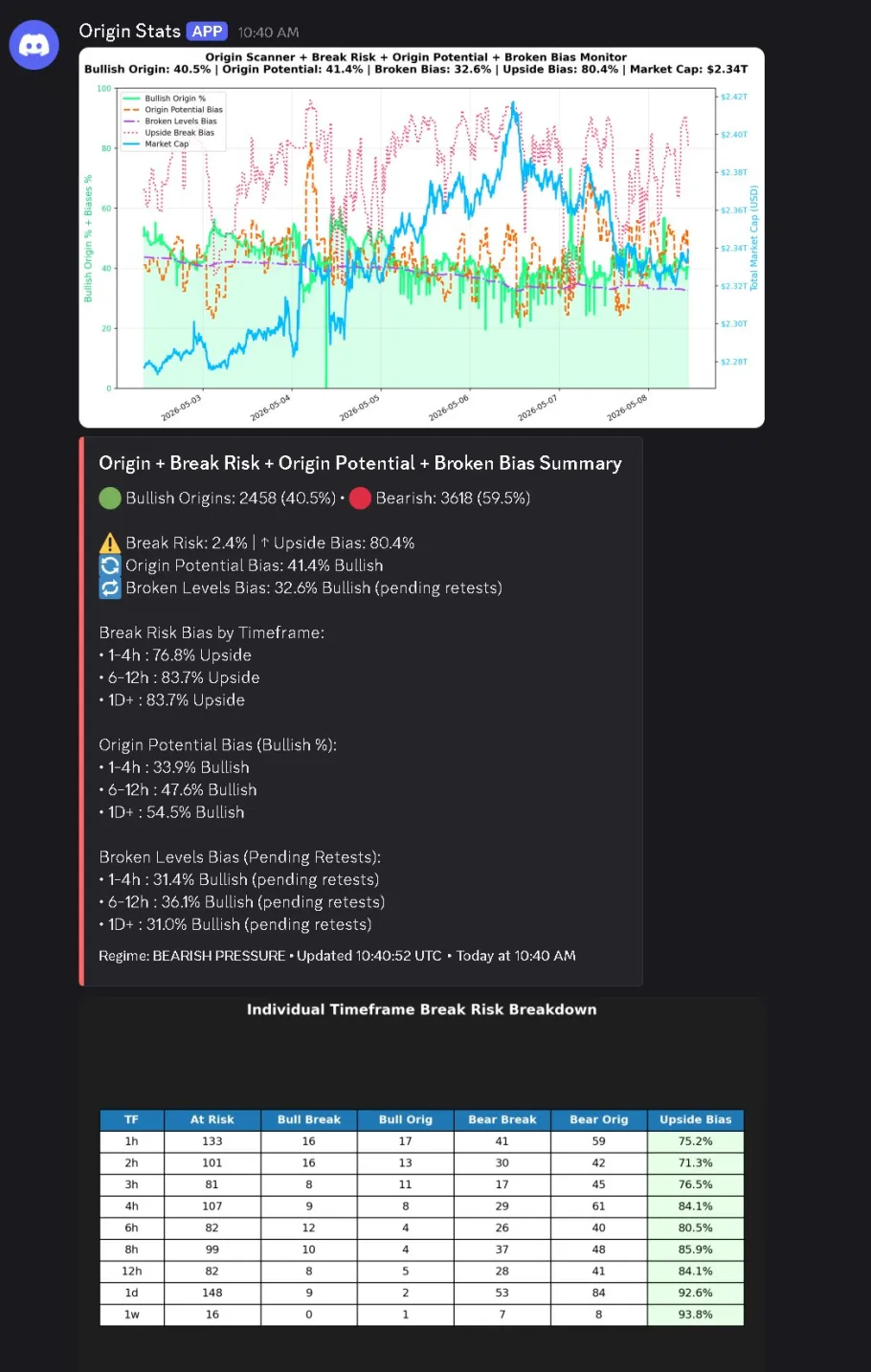
What the Origin Stats output looks like
Real bot output (2026-05-08, 10:40 UTC). Three panels: the time-series chart of 5 metrics across 5 days, the regime-summary card on the left (red bar = BEARISH PRESSURE), and the per-TF break-risk table at the bottom. The contradiction this is showing: raw count says 59.5% of origins are bearish, but Upside Bias is 80.4% — meaning when bearish breaks happen, they tend to get swept and reverse upside. 1d Upside Bias 92.6%, 1w 93.8%. Naive read says "bearish dominant"; method-aware read says "long the structural levels — the bear setups likely fade."
How to read the contradiction
The five readings (not just metric names)
What each Bias-Scanner number means
Break-risk % — how much is at risk of breaking.
Upside bias — which way the watched levels want to break.
Origin potential — whether new origins are more likely above or below.
Broken-level bias — the direction of pending retests.
Per-TF breakdown — can CONFLICT across TFs; read it as a sequence, not a single verdict.
Coverage map: it tracks holds, breaks and the two range-trend classes; it does NOT track normal trends or polarity-flipped S/R (roadmap: restrict polarity to daily+). The ATR-normalised "green blob" panel shows proximity.
One number per TF bracket. The macro answer to "what is the market doing right now" without 60 charts of work — but read the bias %, not the raw count.
Chapter 4.5
What does the Origin Bot tell you and when?
▶
You can't watch every TF on every coin in a 540-token universe. The Bot watches them for you and pings only when an origin actually prints — turning a 24/7 vigil into a notification.
Origin Bot — Discord scanner
Discord bot returning S/R levels near price for any tracked token. ~540+ tokens, plus forex and stocks. CSV Data Members only. Updated in V62 (2026) — the v1 commands (/close-origins, /big-close-origins) were consolidated into a single origin command with flags.
Commands (v2 consolidated syntax)
/origin SOL — default: 6 above + 6 below S/R levels for SOL.
/origin SOL all — every time frame, top 6 each side.
/origin SOL big — 1-day-plus levels only (HTF trades).
/origin SOL pot — include "potential" origins (unconfirmed; level forming but not yet validated).
/origin TOTALS TV — total market cap version (the TV qualifier).
Rate limit: 1 request per 15 seconds. Source: V62 (qMf_DjM-rr0).
What does #originrecent show?
A newer command added to Origin Bot that surfaces the most recently touched or created Origin support/resistance levels across the watchlist — without specifying a token. Useful for a quick market-wide pulse: what levels has price just interacted with, and are any of them starting to form structure or ranges?
How to use it
#originrecent — posts the freshest touched/created Origins. Inspect them to spot which levels price is paying attention to right now, and whether forming structure suggests an upcoming range.
Filter by created vs touched and by symbol / TF, e.g. origin recent created BTC — a created flag means a brand-new origin just formed; a touched flag means an existing one is being tested.
Don't trade the touched origin. A touch means the range is being tested. Pull the most recently CREATED origin and trade the first hold that forms after it — that first hold is the highest-probability entry, not the touch itself.
"New Origin Bot Command. Shows the most recent touched or created Origin support or resistance levels. Now you can look into these and find what structure/ranges they are looking to create."
— Syndotc · X, 2026-05-07
The range retest command (4.618 → 3.618)
Added in the 24H stream: a filter for the single range-retest relationship FibLab actively tracks. Once a range's 4.618 is touched or passed, the retrace to the not-yet-revisited 3.618 has roughly a 95% chance — so the command returns the range start candle (fib anchored on the range start) and the relevant 3.618 that hasn't been revisited yet.
How to use it
range retest — surfaces ranges where the 4.618 has been hit and the 3.618 is still open. Accepts a high-TF input to ignore sub-daily noise.
Pairs with the range-fib mechanics in L3.4 — see Range retest (4→3).
"The relevant 3.618 level that hasn't been revisited after the 4.618 was touched."
— Syndotc · Video 90 (24H livestream · ~05:10:22)
Output color coding
Green — untouched (highest probability).
White — touched but not broken.
Red — broken (retest target).
Origin Trading Alert Scanner v2
Watchdog scanner of all 540+ tokens. Posts in Discord by TF whenever a break converts to origin. Triggers every ~10 min, only on candle close.
Bearish + death cross + first-touch = ideal short.
First-touch origin = highest-probability scalp.
Already-touched origin = still tradable but use other confluences.
"If you can compound your money by 1% a day, you won't need to worry about working anymore over a decent period of time, and this is the kind of thing that can do that for you."
— Syndotc · Video 27
Power-user commands & caveats
Lesser-known bits
debug — enumerates ALL the timeframes a level exists on (the bot-side equivalent of the Dashboard's filter-by-price).
AVO (Abnormal Volume on Origin) — an existing alert; roadmap is to fire it on regime / bias flips. OTT is a flagged-but-undocumented label.
Don't over-read the tool colours yet
Several tools were "slapped together with AI" — red is meant to be broken, green untouched, but it's inconsistent. The Origin Bot is a proximity scanner, not a quality filter.
If the drag interaction bugs out, clear cookies. Lookups cap around 120 days (then use the Dashboard).
The Bot is your overnight self — trades nothing, but pings when the trade you'd want to take has actually printed.
Chapter 4.6
What does the dashboard show and how do you use it daily?
▶
Every other tool in Layer 4 answers one question. The Dashboard is the surface where their answers stack — the single screen that tells you "what is the market doing right now," in one glance.
What is the flagship view?
Web dashboard: multi-token break/origin/hold table, in-house liquidity heatmap, recent-updates feed, chart viewer. Center of the FibLab toolset.
Native Time-Frames — non-standard periods (134-day, 347-day, 694-day, etc.).
Widgets / Table Filters — filter by price, status, singularity.
Recent Updates feed — live alerts on level activity.
Chart Viewer — one-click into TradingView for the chart.
Filter by price — the killer feature
Type 109.4 → lists every TF that level exists on. Multi-TF agreement = strong reaction zone.
Singularity filter — the rare violent levels
How to find singularities
Symbol → Native → Break/Origin → Widgets → Table Filters.
Turn OFF: everything except Origin Touched and Origin Untouched.
Turn OFF: Non-Pure ranges.
Turn ON: Singularity filter.
Result: maybe a half-dozen levels per token. The most violent ones.
Chart Viewer — one-click to TradingView
Each row in the dashboard's level table has a chart icon. Clicking it opens TradingView pre-loaded for that token — the bridge between the dashboard's level data and your chart workspace.
How Chart Viewer fits the workflow
What it does — one-click from any dashboard row to TradingView for that token. No copy-pasting tickers.
What it doesn't replace — your TradingView layout, indicator setup, and chart analysis. Chart Viewer is a shortcut, not a chart tool.
When to use it — after identifying a level via price filter, click the chart icon to verify it visually before acting. The step 4 in the daily routine below.
What does the daily routine look like?
"Make this part of your sort of daily routine. Check it a couple times a day. So if you come in here, it just tells you what's changing."
— Syndotc · Video 12
Open dashboard.
Check Recent Updates for major level activity.
Pick a level on a token. Filter by price → see all TFs it exists on.
Click chart icon to verify on chart.
CSV Data column key (v2026-06-03)
The CSV Data Members export gained new columns in V75. If you open the CSV and the header row doesn't match what the older chapters describe, this is the v2026-06-03 schema:
What each column means
direction — long / short / origin only (no hold on that TF).
time frame — native TF. Only 1D lines up directly with TradingView; everything else is a native period (see L4.3).
validation start — timestamp the forming candle closed and validated the hold/break. Before this, the level is a "future trade," not actionable.
current bracket — in bracket (still in the same fib bracket as open), out of bracket (moved but not yet reopened), not applicable (not yet closed → future trade).
wick engulfment — boolean filter. If false, ignore the row's wick numbers; only body-based prices are meaningful.
entry price / target price — body-based, not wick-based.
Min-Ob — Minimum Obligation Move — the smallest move price is obliged to make from a validated entry. The minimum TP you can responsibly take.
Source: V75 (CSV Data Walkthrough v2026-06-03, 40 min). V76 is the companion TradingView indicator that pairs with the CSV file.
Singularity levels — the full picture
A singularity exists on EXACTLY ONE timeframe (counter-intuitively strong despite being lone). It reacts fast because that one TF closes with no others to wait on, and it's fragile — one close beyond it on that TF erases it. A one-DAY singularity resolves within ~1 day of being touched, and a singularity can overpower a higher-TF move. The Origin Bot doesn't surface them well; the Dashboard has a dedicated tick-box. (Named cases: BTC 6K, SOL 141, the $53,333.33 Germany-selloff, BTC ~89K.)
Hold-finding workflows & roadmap
Filters that surface the right holds
Drop possible/inactive and sort by ACTIVATION TIME to surface the most-recent HTF holds.
Untick active+completed and tick inactive to find future / untested levels.
New closing-times column added; hold states are active / inactive / possible.
Roadmap / missing: no price slider yet, Trend module in development; ~60k holds watched but no hold alerts yet; ~600-token timestamp-ordered refresh.
In-development indicators
Fibli — a new liquidity indicator framed as a TIMER ("when to move / can I go watch a movie"), not an entry tool; contrast with the Dashboard liquidity heatmap. A backside / frontside indicator is also in the works (identifies when a backside forms and projects an "air-gap run"). Both in testing. Layered liquidity (100x + 50x + 25x stacked at one price) is a real cross-risk-profile cluster to watch.
Every other tool answers one question. The Dashboard is where their answers stack into a single screen verdict.
Chapter 4.7
What is Atlas and how does it fit the method?
▶
TradingView won't show you a 1W 50-EMA on your 4H chart as a static horizontal line — it'll redraw the EMA on the new TF. Atlas paints the higher-TF EMAs and other macro lines (value gaps, psi high / low) as fixed horizontals on whatever TF you're charting, so they become reference levels you can stack with breaks/origins.
What it shows
Static horizontal lines for cross-TF references that other indicators won't surface as fixed levels:
Levels Atlas paints
Multi-TF EMAs — the 50-EMA from each major TF (1M / 1W / 1D / 4H), each shown as a static horizontal line. The weekly 50-EMA in particular is famous for being where major trend changes pivot and where significant support/rejection interactions occur.
Value gaps — unfilled price gaps that act as magnets for revisits.
Psi extremes — psi high / psi low markers (statistical extremes worth flagging on the chart).
Other macro lines — depending on settings, additional reference levels Blue specifically requested for confluence reads.
How it fits the method
Atlas is a personal-confluence overlay, not core method. The framework's load-bearing tools are 4.1 Hold Levels through 4.6 Dashboard. Atlas sits on top — Blue uses it (and RSI) for personal "timing" confirmation when sizing real money, but stresses these are discretionary additions, not requirements.
"The trend lines and breaks don't give you any insight about timing — that's why I keep RSI and Atlas. They're not part of the framework. They're how I personally seek out extra confluence before I put real money down."
— Blue, V87 Discord livestream Q&A · ~52:00
Settings worth knowing
The dials
EMA toggles — turn each TF's 50-EMA on/off independently. Most users keep 1W + 1D on; 4H optional.
Value gaps — toggle on/off; can clutter a chart that already has heavy break/origin lines.
Psi high / low — surface only when you want statistical-extreme reads.
Forward-only display — Blue specifically wanted Atlas to show levels as forward-looking horizontal lines, not historical moving curves: "I'm forward looking. I cannot change that it reacted here."
Atlas surfaces forward-looking macro levels (multi-TF 50-EMAs, value gaps, psi extremes) that TradingView would otherwise hide. Use it for confluence, not for setup validation.
Chapter 4.8
Master Levels — the whole market on one gauge
▶
The Bias Scanner (Ch 4.4) reads ONE token. Master Levels sits a layer above it: it takes the break / origin / hold / trend state of ~600 tokens and collapses the entire market into a single risk-and-direction read — the precursor data layer for a real trend-reversal tool.
"Master level is taking all of what you saw above and throwing it all together and basically just giving you an overview of the average amount of the market that's at risk and whether it's pointing up or down."
— Syndotc · Video 89 (24H livestream · ~02:00:48)
What it rolls up
Coverage: ~600 tokens scanned across 1 / 2 / 3 / 4 / 6 / 8 / 12h + weekly, then aggregated (e.g. "109 1-hour levels at risk").
Break-risk % — a market-wide stress gauge. ~2% is the quiet "rookie" baseline; an 8-9% spike precedes a big move / dump (it hit ~8% right before a recent dump).
Direction score — blends breaks / holds / trends into one number. Below 50% = bearish structure; during the pump it ran 60% minimum, into the 80s-90s, one TF hitting 100%.
Barometer — consolidated S/R bucketed by TF bracket; big clusters show as "close boxes" you can expand.
S/R imbalance — flags where support and resistance are completely out of balance, used to locate the TRUE top or bottom.
Caveats · read it as a gauge, not gospel
1-week ceiling — there is no 30-day+ rollup yet, and at stream time the board only had ~2 weeks of history behind it.
The "pending broken bias" line was flagged by Syndotc as still suspect.
In development: a hold-balance top/bottom picker (picks tops & bottoms across a whole cycle but takes ~4.5h per report) and a combined cross-exchange volume read are not yet released.
One number for the whole market: ~2% break-risk is calm, 8-9% is a warning; under-50% direction is bearish. Confluence for your single-token read, not a signal on its own.
Open questions
No reveal. No answer key. Carry them or open a chart.
Hold Levels uses body-engulfment as the trigger. Would wick-engulfment work as a parallel indicator, or is body-only structurally required?
Bias Scanner reports origin hit-rate. At what historical hit-rate does the indicator stop being information and start being a contrarian signal?
Edge-Case Files
Charts that look textbook-correct and failed. Diagnose first, reveal second.
Diagnose
You set Break/Origin Detector ATR proximity to 0.5× — you wanted "only the closest setups." For three days the bot was silent. On day four it pinged once, you took the trade, and the level was already 0.4 ATR past your fill before you got in. What broke?
Diagnosis
0.5× ATR is too tight for the alert layer — by the time price is within that band, you're chasing the move, not catching it. The indicator did exactly what you asked. The ask was wrong.
Rule restored: ATR proximity is a parameter, not a truth. Set it to the band where you'd actually want a notification — typically 1.5–2.5× ATR for entries, looser still for "watch list" alerts. Tight ATR = late ping = always chasing.